

JSONB vs. JSON
The field offers two storage modes:
If you’re not sure, pick JSONB.
When to use a JSONB field
Reach for JSONB when the data is structured but the structure varies between records or evolves frequently:- Configuration and settings —
{"notifications": true, "theme": "dark"} - Third-party API payloads — raw responses from Stripe, webhooks, logging payloads
- Dynamic attributes — products where a T-shirt has
sizeandcolorbut a laptop hasramandcpu - Lists of strings or numbers —
["tag1", "tag2", "tag3"]
Configuration options
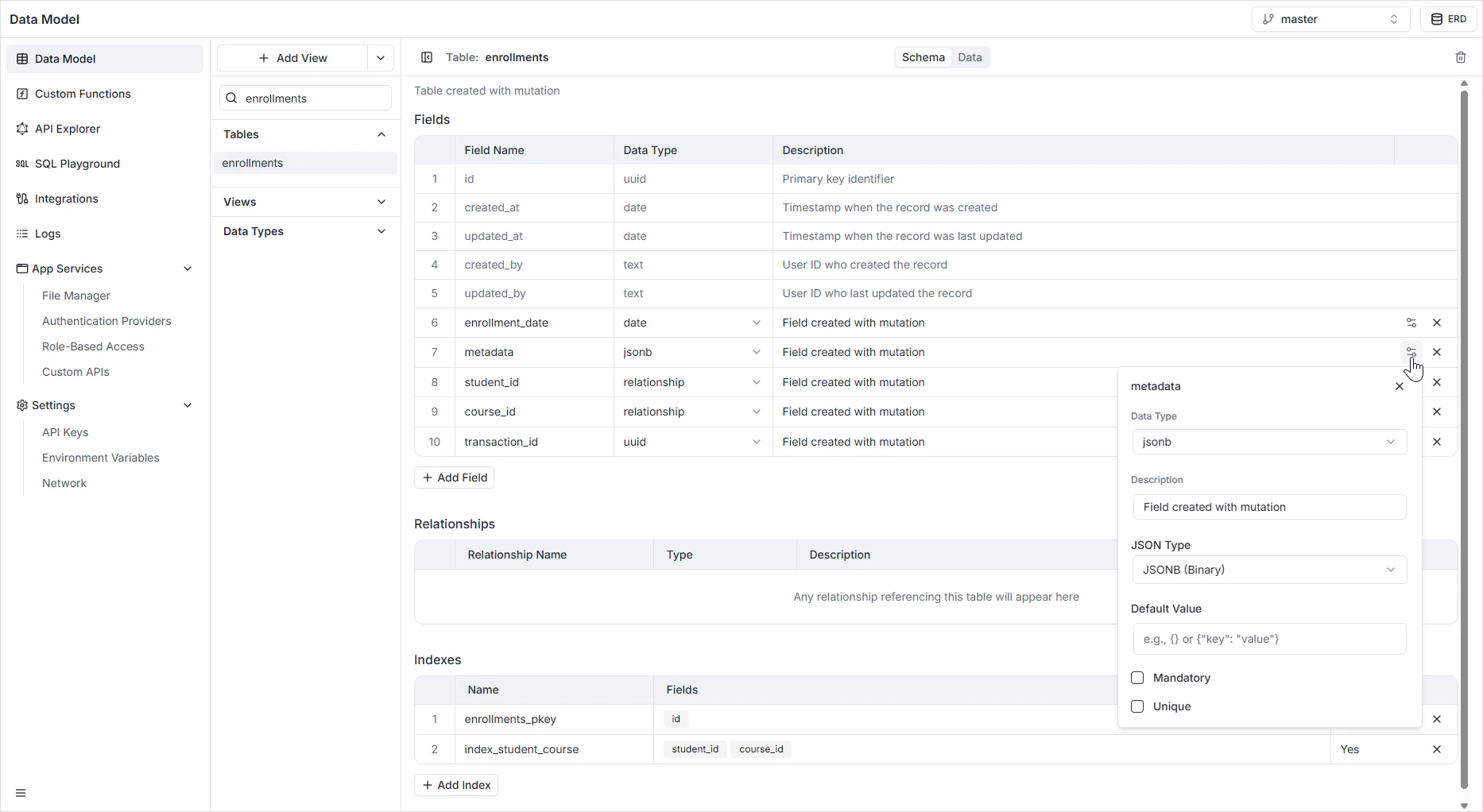
How it appears in the API
The field is generated as aJSON scalar in GraphQL and as a nested JSON value in the REST API. Clients receive and send the value as a structured object, not a string. See the GraphQL API Explorer to inspect the generated types.
Permissions
JSONB fields are subject to the per-role read and write rules configured in Role-Based Access.FAQ
Why JSONB instead of JSON?
Why JSONB instead of JSON?
JSONB is decomposed and indexable, which makes filtering on keys (for example,
attributes->>'color' = 'blue') fast. Plain JSON has to re-parse the value on every read. The only reason to pick JSON is if you need to preserve the exact input text — whitespace, duplicate keys, key order.When should I use JSONB instead of separate columns?
When should I use JSONB instead of separate columns?
When the shape varies between records or changes often. If every record has the same fields and you’ll filter on them, model them as explicit columns — you’ll get better validation and clearer types in the generated APIs.
Can I query inside a JSONB value?
Can I query inside a JSONB value?
Yes. Use the SQL Playground or a custom function for ad-hoc PostgreSQL JSONB operators (
->, ->>, @>). The auto-generated GraphQL API surfaces the value as a whole; deep filtering inside JSONB is best done with a view or a custom resolver.What does the Unique constraint compare?
What does the Unique constraint compare?
Exact binary equality of the stored JSONB value. Note that JSONB normalizes —
{"a":1,"b":2} and {"b":2,"a":1} collapse to the same value, but {"a":1} is distinct from {"a":1,"b":null}.What's a sensible default value?
What's a sensible default value?
{} for an object-shaped field or [] for an array. Defaults keep clients from having to handle null in addition to “empty”.